Skip to content
SalesBoto

An AI employee for your ecommerce store

Your store doesn't fail. It goes idle.

Ten times more gets done in your store, without hiring.

SalesBoto takes on the jobs that die when you get busy — discounts, catalog copy, dead stock, promo creative — and asks before anything a customer can see changes.

Read-only. Nothing changes on your store.

Discount audit Needs you
Finding
AUTUMN30 · 30% off · No end date

At 30%, some of the products this discount covers would sell below cost.

Proposed change
Reduce to 15% 30% → 15%

At 15%, every product this discount covers stays above cost.

Approve Discard

Nothing changes until you approve.

Arctic Peak Outfitters, an outdoor-apparel store in Austin, Texas

The ecommerce employee you couldn't afford to hire.

What you're hiring

An AI employee for your ecommerce store. Not a chatbot.

Every store needs someone whose whole job is the work that piles up: the discounts nobody has checked since spring, the product pages still half-written, the stock that hasn't moved. Most stores can't afford that person. SalesBoto is that hire: an employee for the whole back office of a store, from the catalog to the discounts to the stock. It does those jobs on the hours you set, whether or not anyone is logged in, and stops for your yes before anything reaches a customer.

You talk to it in chat. Chat isn't the job.

  • 01Skills, not features. Today: discounts, catalog copy, dead stock, promo creative, and the schedule that runs them. It takes on new skills the way an employee does, and your store gets each one without changing anything.
  • 02Asks before it matters. Nothing a customer can see changes without your approval.
  • 03Plain about where it stops. Each skill says what it does and where it stops, right on its own card.
How it works →
The chat workspace with what's running on the left, a discount audit streaming its progress in the conversation, and the staged findings open in the canvas on the right.
Preview · Arctic Peak Outfitters

Its first night

What's waiting when you sit down at 8 a.m.

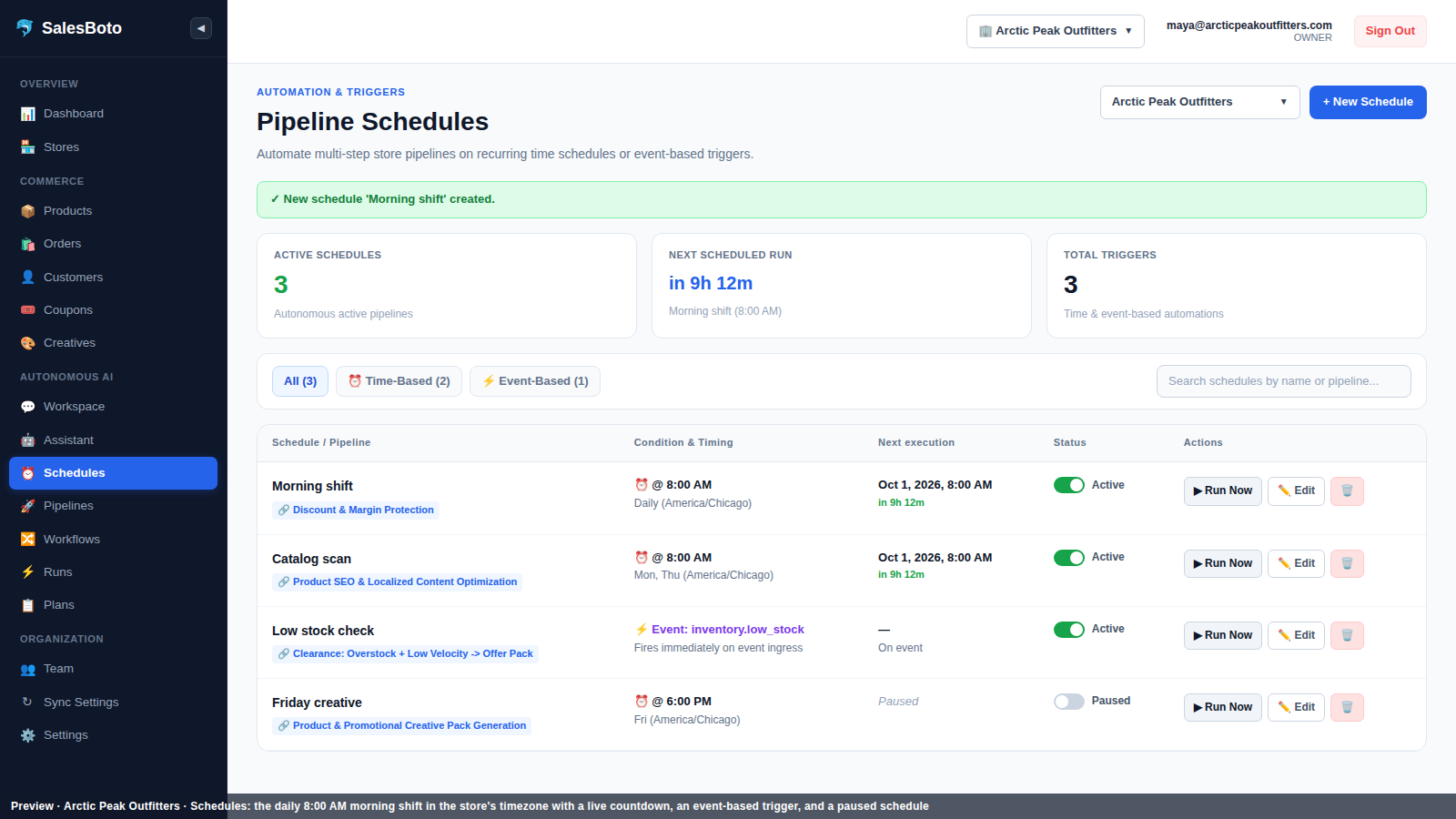
Connect your store and give it the default morning shift: 8:00, your timezone. This is one night's work, shown as it lands. Nothing below is live. Every item is staged for your yes.

  1. 1 Discounts

    A 30% discount with no end date was cut to 15% in the proposal, and an old one was queued to be switched off.

    Two cards were waiting in the canvas, one per finding, and any discount on a product with no cost on record was flagged for you rather than corrected.

    After approval on Arctic Peak Outfitters: 1 discount reduced from 30% to 15%. 1 old discount deactivated.

  2. 2 Catalog

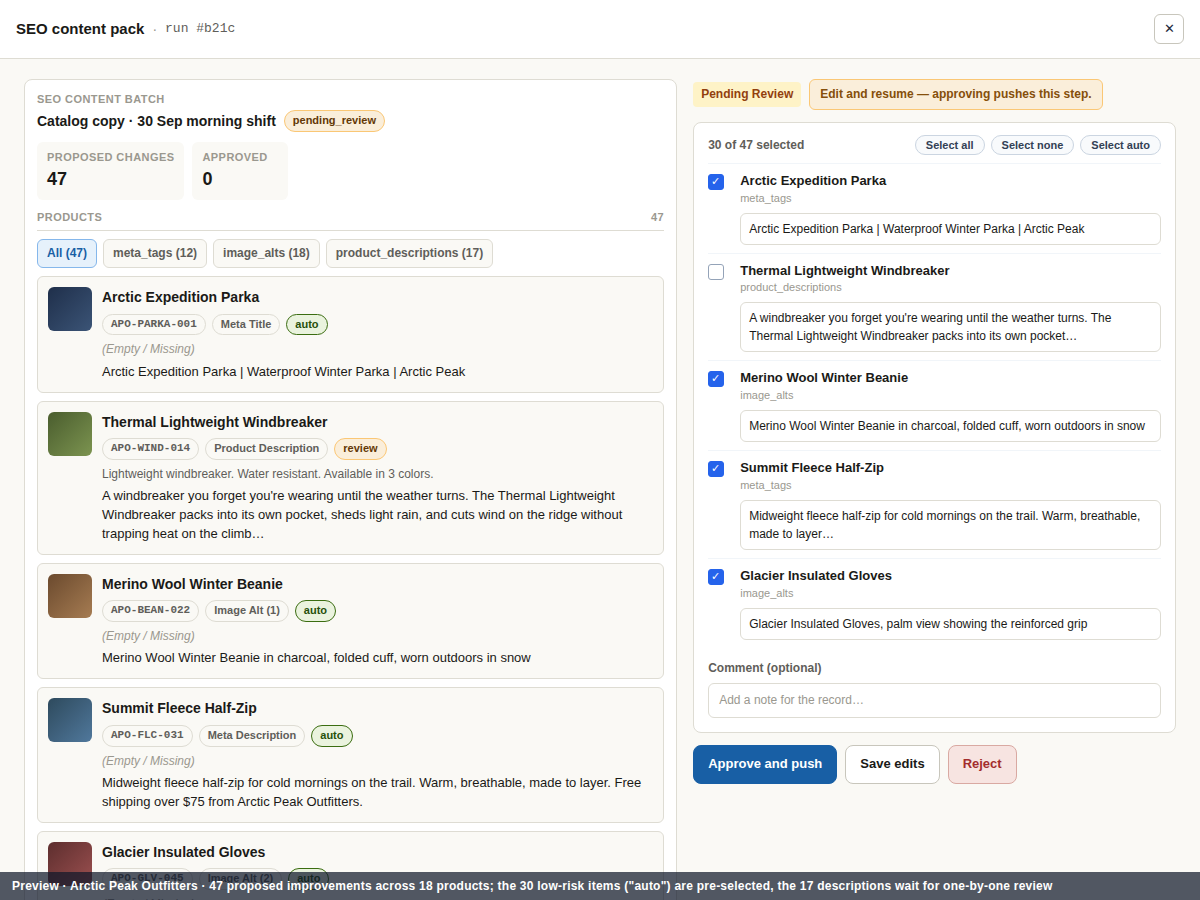
    47 improvements across 18 products were written and sorted by risk: 12 meta tags, 18 alt texts, 17 descriptions.

    The meta tags and alt texts, which shoppers never see, were pre-selected for one approval; the 17 descriptions waited for you one at a time, before and after side by side.

  3. 3 Dead stock

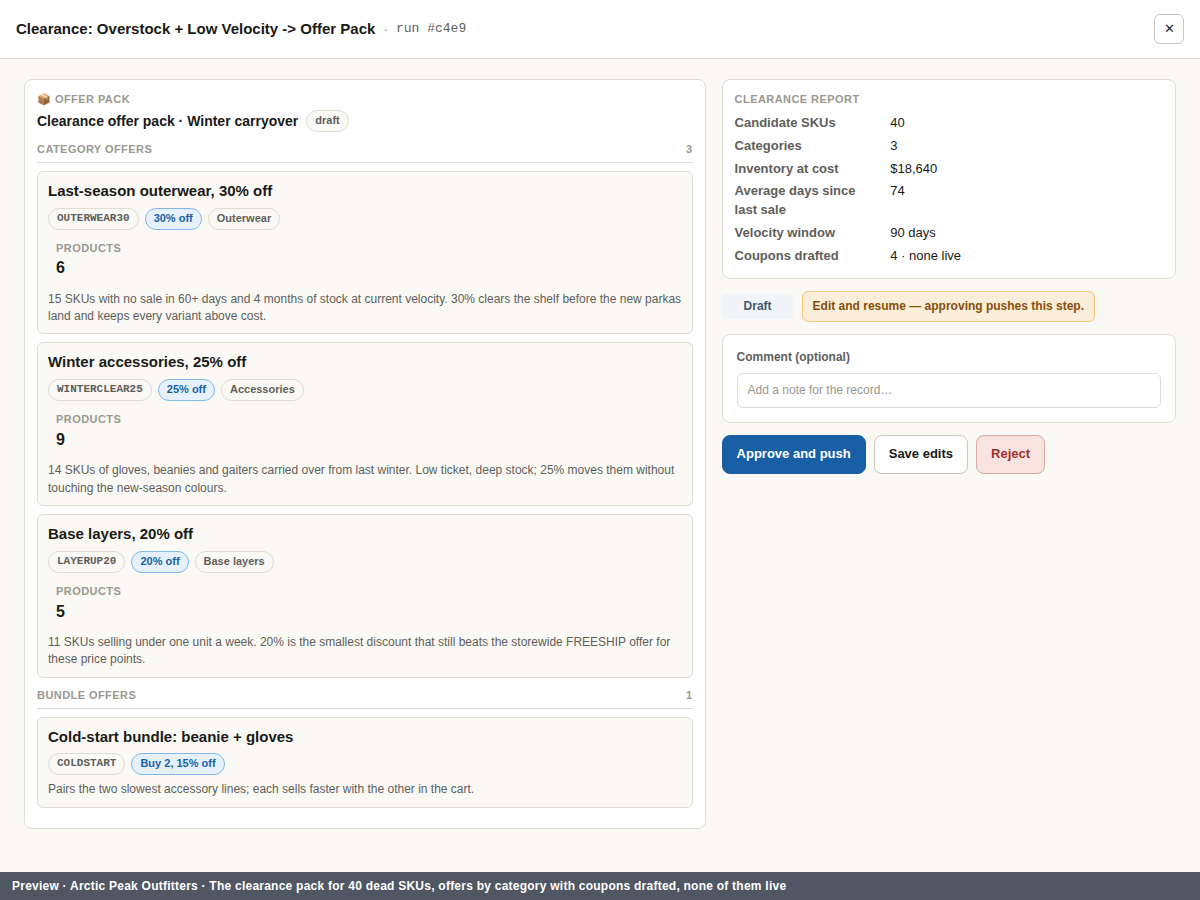
    The clearance pack for 40 dead SKUs was waiting for approval at 8am.

    The offers were drafted by category with the coupons ready to go, and not one of them was live.

  4. 4 Promo creative

    Three angles for the Arctic Expedition Parka — promo, social proof, feature highlight — with SAVE20 on the badge.

    Three finished images with caption and hashtags were ready to approve, discard or download, from one product, which is what a creative run covers today.

  5. 5 8:00 a.m.

    All of it staged. None of it live. Waiting in your timezone.

    The shift ran at 8:00 in your store's own timezone, and every approval waits for you, whether you get to it at 8:05 or on Thursday.

Who it's for

Built for the store with no one to hand this work to

Three kinds of store, one problem: the work that keeps a store sharp is nobody's whole job.

01

The owner doing everything

Buying, support, shipping and marketing, all before lunch. The discount audit happens never. Give it that job and read the cards with your coffee.

02

The store with a small team

Two or three people, each wearing four hats. It does the repetitive, careful work and leaves every decision with the person who should make it.

03

The store that outgrew its back office

Hundreds of products, a catalog written by suppliers, discounts from three seasons ago. It works through the backlog one approved change at a time.

One shift

What one night found on Arctic Peak Outfitters

Products read
142
Products read
Catalog improvements drafted
47
Catalog improvements drafted
Discounts fixed
2
Discounts fixed: one reduced, one switched off
Slow-moving SKUs found
40
Slow-moving SKUs found

Arctic Peak Outfitters. Every number is from a real shift, and every change waited for approval.

How it's kept safe

It asks before it spends

An employee who changed prices without asking wouldn't last the week. Three rules, each with its own page.

Nothing a customer can see changes without your approval

It reads your store, proposes the change, and stops. Nothing is applied until you say yes, and everything before that is a draft you can edit or discard.

Asks before it acts →

Every change records who approved it

Each change on your store is recorded with who approved it and when. "What changed last night?" has an exact answer.

Every change is signed →

It says where it stops

Nothing it does reaches a customer, a budget or a public channel without your yes, and a discount on a product with no cost on record is flagged, never guessed. Where a skill stops, its own card says so.

What it does, and where it stops →

Getting started

From a blank workspace to the first card

  1. 1

    Connect your store.

    Create a custom app in your store's admin, choose what it may read, and paste its two keys. Your admin password is never asked for.

  2. 2

    It reads.

    Products, costs, inventory, orders, customers and discounts come in, and it checks they're fresh before any shift runs.

  3. 3

    Set its hours.

    The default is a morning shift at 8:00 in your timezone. Change it, or run any skill on demand from the workspace.

  4. 4

    Approve the first cards.

    The first shift's findings wait in the workspace with Approve and Discard. Nothing on your store has changed yet.

Before you connect a store

Will it change my store without asking?+

No. It reads your store, proposes the change and stops there. Nothing is applied until you approve it; the audit, the findings and the drafts stay in the canvas. You can approve today, or in three days, and the shift waits. Every applied change is recorded with who approved it.

Is it a chatbot?+

Chat is how you brief it and review its work: start a shift, check the store is ready, open the canvas, set a schedule. The work itself runs on the hours you set, whether or not you're logged in, and stops for your yes before anything reaches a customer.

Can it do my email or my customer support?+

Not today. The what-it-does page lists the skills it does now, each end to end. It takes on new work the way an employee does, one skill at a time, and your store gets each one without changing anything on your side. If there's a job you'd hand it first, say so on the access form; we read every one and reply from a real address.

Does it work with my platform?+

Shopify today, through your platform's own app permissions; it never holds your admin password. The integrations page lists exactly what it reads and what it can change, always after your approval. If your store runs on something else, it can't read it today. The access form on the pricing page is where to tell us.

What happens to products with no cost recorded?+

Their discounts are flagged for your review, not corrected. An unknown cost is treated as unknown, never as zero, and it never guesses one. Any reduced discount it proposes is worked out only from products with a known cost. Before a run it checks that your product and cost data are fresh, and tells you if they aren't.

How much does it cost?+

We're in early access and there's no price list. What's decided: one list whatever platform you're on, no per-platform tiers, and nothing charged for anything that doesn't run on your store. The pricing page says what early access is and how to ask for it.

How approval works →

Free, read-only

See what one shift finds.

Run the discount audit or the catalog scan on Arctic Peak Outfitters, an outdoor-apparel store with 142 products. Read-only. Nothing changes.

Read-only. Nothing changes. Results appear below.

How approval works →